
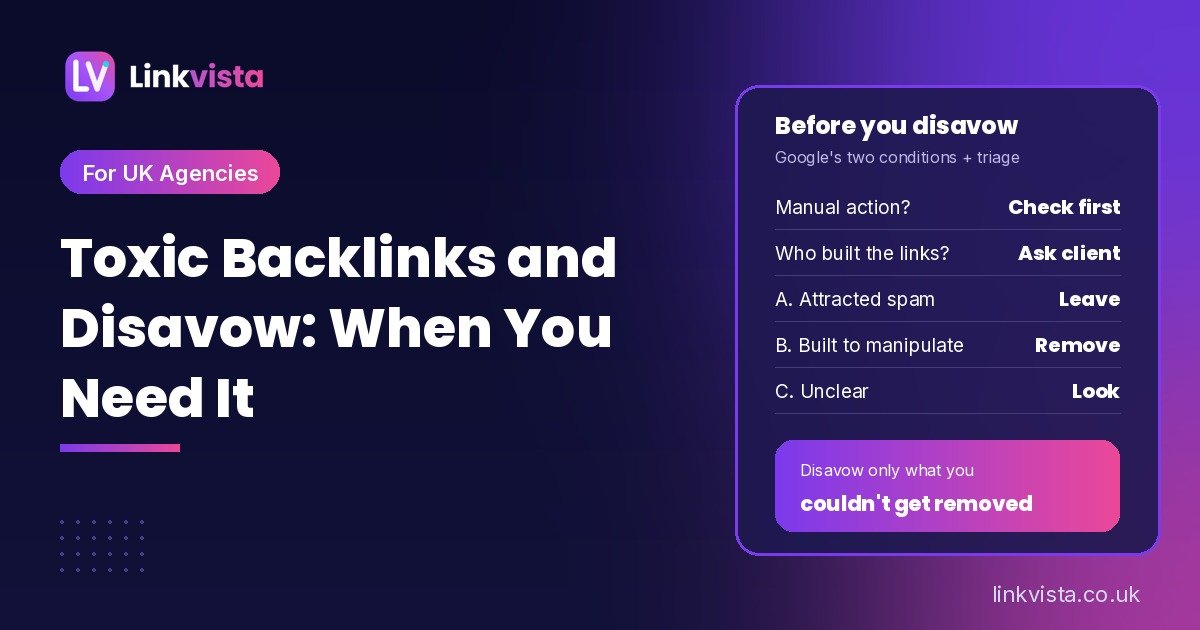
A new client forwards a backlink report from an SEO tool. Hundreds of domains are marked “toxic” in red, and the message underneath says: “Do we need to disavow these?” Or an account manager runs an audit during onboarding and finds the same thing. Either way, the agency has to give an answer it can stand behind, and the wrong one costs either wasted hours or lost rankings.
This guide is for agencies and consultants who manage backlink profiles for clients. It explains what a “toxic” score is and isn’t, the two conditions Google sets before you should disavow anything, a triage method for sorting a flagged list in an afternoon, two worked examples (both hypothetical), the technical details that trip people up when a disavow file really is needed, and how to explain all of it to a client.
The short answer
Most agencies should not disavow links just because a tool calls them toxic. Google’s own help page says that “in most cases, Google can assess which links to trust without additional guidance, so most sites will not need to use this tool.” It recommends disavowing only when both of these are true:
- The site has “a considerable number of spammy, artificial, or low-quality links” pointing to it, and
- Those links “have caused a manual action, or likely will cause a manual action” on the site.
So the real questions are not “how many links are red in the tool?” but “is there a manual action?” and “did someone build or buy a large number of manipulative links to this site?” If the answer to both is no, the usual right move is to leave the links alone, record your reasoning and spend the time on something that helps the client.
“Toxic” is a tool label, not a Google term
Google’s spam policies, its disavow help page and its Manual actions help page don’t use the word “toxic” at all. The spam policies define link spam as “the practice of creating links to or from a site primarily for the purpose of manipulating search rankings.” The examples it lists are about intent and behaviour: buying or selling links for ranking purposes, excessive link exchanges, automated link building, low-quality directory or bookmark links, widely distributed footer or template links, and forum comments with optimised links. None of them is a score.
A toxicity or spam score is each tool’s own estimate of how risky a link looks, built from the markers that tool has chosen. It can be a useful way to sort a long list, but it doesn’t tell you whether Google has a problem with the link, and two tools can rate the same domain very differently. Treat the score as “worth a look”, never as “must remove”.
Google has also said it works to neutralise unnatural links rather than let them pass value. When it announced the December 2022 link spam update, it said it was using its AI-based SpamBrain system “to neutralize the impact of unnatural links on search results”, and that SpamBrain could “detect both sites buying links, and sites used for the purpose of passing outgoing links.” The practical effect for most clients is that random spam pointing at them is simply ignored.
Spammy, manipulative and “toxic” are three different things
- Spammy links are low-quality links almost every site attracts without asking: scraper sites copying content, auto-generated “website value” pages, odd foreign-language link lists. Nobody at the client built them.
- Manipulative links are links someone built or bought mainly to move rankings, which is what Google’s link spam policy describes. These are the ones that can lead to a manual action.
- “Toxic” links are whatever a particular tool’s model flags. The list usually contains some of both groups above, plus some perfectly normal links.
The triage below is about separating those groups, because only the second one is a real reason to act.
A triage method for a client’s toxic link report
This is our own working method, not a Google process. It follows the order Google’s documentation implies (manual actions first, removal before disavowal) and adds the step most tool reports skip: asking who built the links.
Step 1: Check the Manual actions report
Open the client’s Search Console, go to Security & Manual Actions, then Manual actions. Google’s Manual actions report help page explains that a manual action is issued “when a human reviewer at Google has determined that pages on the site are not compliant with Google’s spam policies”, and that a site with no actions shows a green check mark. Look for “Unnatural links to your site” in particular. Check the history too, because an old link-related action tells you the profile has a past.
If your access level doesn’t show the report, ask the client to check it or to give you fuller access. You can’t make this decision without it.
Step 2: Ask who built the links
A tool can’t see the client’s history, but the client can tell you in one email. Ask:
- Has any agency, freelancer or in-house person bought links, link packages or “high-DR” placements for the site? When, and roughly how many?
- Did any of that work use exact-match keyword anchors, private blog networks (PBNs), link exchanges or automated tools?
- Was the domain bought from someone else, or merged with another site?
- Has anyone uploaded a disavow file before? If so, can they find it?
The answers matter more than the score. A site whose owner never paid for links is in a very different position from one that bought a 200-link package from a network two years ago, even if both reports show the same number of red rows.
Step 3: Sort the flagged domains into three groups
Export the client’s links from Search Console as well as the tool, because Search Console’s link data comes from Google itself rather than a third-party crawler. The help page explains you can export by hostname (Top linking sites > Export) or in date order (Links report > Export external links > Latest links). Then work through the flagged domains, starting with the ones that link most and the ones that appeared recently, which is also the order Google suggests for large lists.
| Group | What it usually looks like | Usual action |
|---|---|---|
| A. Attracted spam | Scraper copies of the client’s pages, “site worth” and stats pages, auto-generated directories, link lists the client never asked for | Leave alone. Note it in the audit. |
| B. Built to manipulate | Paid links with exact-match anchors on unrelated sites, PBN posts, mass link exchanges, automated profile or comment links, often matching what the client told you in step 2 | Count them. If there are many, or there’s a manual action, move to removal and possibly disavowal. |
| C. Unclear | A real-looking site with a low score, a directory you don’t recognise, a link with an odd anchor | Open the page in a browser and judge it as a reader would. Then move it to A or B, or mark it as a normal link. |
For group C, a quick manual look answers most questions: does the site have real articles and a real topic, does the page make sense, and would the link exist if nobody were paying? Our guide to judging backlink quality by DR and traffic and our checklist on how to spot a PBN cover what to look for. To see a single page’s rel attribute and anchor quickly, you can use our free Link Analyzer.
Step 4: Make the decision
| Manual action for unnatural links? | Considerable group B? | What to do |
|---|---|---|
| No | No (mostly group A) | Don’t disavow. Record the check and the reasoning, then move on. |
| No | Yes, and the client or a past provider clearly built them | This is the “likely will cause a manual action” case. Stop any ongoing link schemes, request removal where you can, and consider a disavow file for the group B domains you can’t get removed. |
| Yes | Yes | Follow Google’s removal process, disavow what you can’t remove, document everything and request a review. |
| Yes | No obvious group B | Look again: check old link-building invoices, the domain’s previous owner and any widget, footer or template links. A manual action for unnatural links means a reviewer saw a pattern. |
“Considerable” isn’t defined by Google, so don’t turn it into a percentage you can’t support. Judge it by what the links are and how they were made: a handful of paid links from years ago is not the same as hundreds of network posts with keyword anchors.
Two worked examples (hypothetical)
Example 1: a red report with no history
A local accountancy firm joins an agency. Its owner sends a tool report flagging 140 of its 410 linking domains as toxic. The Manual actions report shows no issues and no history. The owner says nobody has ever bought links for the site. Sorting the 140 domains takes about an hour: almost all are scraper copies, “website worth” pages and auto-generated directories (group A), and the few group C sites turn out to be small local blogs that mentioned the firm.
Decision: no disavow. The agency writes two paragraphs in the audit explaining Google’s two conditions, notes the date of the check and spends the budget on content and a few relevant placements instead. If the owner later sees the same domains in the Links report, that’s expected and isn’t a problem.
Example 2: a bought package from a previous provider
An online retailer moves to a new agency. There’s no manual action, but the client admits a previous provider sold them “200 high-DR links” two years ago. The tool flags 260 domains. Triage finds around 180 group A domains, around 70 group B domains (posts on unrelated sites, almost all with the same exact-match anchors, published within a few weeks of each other) and about 10 unclear sites that turn out to be normal.
Decision: this is a pattern a reviewer could see, so it fits the “likely will cause a manual action” condition. The agency asks the client to stop any remaining work with the old provider, emails the sites where a contact exists to ask for the links to be removed or qualified with rel=”nofollow”, logs every request and reply, and then prepares a disavow file containing only the group B domains that weren’t removed. The group A spam stays out of the file, because there’s no reason to touch it. The agency explains to the client that rankings those paid links were propping up may not come back, because Google may already be ignoring them.
Both examples are illustrations of the method, not real clients, and the numbers are invented to show the reasoning.
If you do need a disavow file: details that trip agencies up
When a disavow is justified, getting the mechanics right matters, because Google’s disavow links help page warns that it “is an advanced feature and should only be used with caution” and that used incorrectly it “can potentially harm your site’s performance in Google Search results.” These points come from that page:
- Domain properties aren’t supported. The tool doesn’t work with a Domain property, and many clients only have one. You’ll need a URL-prefix property for the site.
- You must be a property owner to upload a list, so a “full user” agency login may not be enough.
- A new upload replaces the old list. There’s one list per property. If a previous agency uploaded a file, start from that file, review it and add to it, rather than overwriting it by accident.
- http and https need separate lists if you have both properties. A list for example.com also applies to child properties such as m.example.com.
- File format: a .txt file in UTF-8 or 7-bit ASCII, one URL or domain per line, “domain:” in front of a domain, and lines starting with # as comments. The limits are 100,000 lines (including blank and comment lines), 2MB and 2,048 characters per URL. You can’t disavow a subpath such as example.com/en/.
- Disavowed links still show in the Links report, so warn the client that they won’t disappear from Search Console.
- It takes time. Google says it “can take a few weeks” for the list to be incorporated as it recrawls the web.
Google’s Manual actions help page adds two more points worth repeating to clients: “Make sure that you don’t disavow organic links to your site”, and “Blindly adding all backlinks to the disavow file is not considered a good-faith effort.” For several links from one site, the “domain:” line is the simpler choice. A short file for Example 2 might start like this (hypothetical domains):
# Paid package from previous provider, 2024. Removal requested 3 times, no reply.domain:example-network-one.comdomain:example-network-two.net# Single post, site owner unreachablehttps://example-blog.org/2024/05/best-tips/
Removal requests come first
Where there’s a manual action, Google’s process is: download the links, check them against the link spam policy, contact site owners and ask them to remove the links or stop them passing PageRank (for example with rel=”nofollow”), disavow only what you couldn’t get removed, then select Request Review and “include documentation about the links you’ve had removed and an explanation of any links you were unable to remove.” Keep a simple log for that: domain, contact used, date of each request, reply and result.
Removal requests don’t need to be aggressive. A short, polite email that names the page, the link and the request, without threats, gets better results and reflects well on the client. If your team sends these from the client’s name, agree the wording with the client first. Our post on guest post outreach at scale covers sensible email practice for UK teams.
What to tell the client
Clients who have seen a red report are often worried, and a calm, specific answer builds more trust than a long audit. Something along these lines usually works:
- What we checked: “We checked your Manual actions report (no issues), reviewed the 140 flagged domains and asked about past link building.”
- What we found: “Almost all are automated spam sites that link to many businesses. Google says it can usually work out which links to trust without help.”
- What we’re doing: “We’re not disavowing, because Google recommends it only when there’s a manual action or a large number of manipulative links. We’ll recheck the Manual actions report each month.”
- What would change that: “If a manual action appears, or we find links someone paid for in bulk, we’ll follow Google’s removal and disavow process and tell you first.”
That fits neatly into a monthly report. Our guide to white label SEO reports shows where a short “link profile health” note can sit without crowding the results sections.
What about negative SEO?
Some clients assume a burst of spam links is a competitor attacking them. Google’s disavow help page says that “Google works very hard to make sure that actions on third-party sites do not negatively affect a website.” A sudden rise in spammy links is worth recording and keeping an eye on, but on its own it doesn’t meet Google’s two conditions. Check the Manual actions report, keep your notes, and only consider a disavow file if a manual action appears or the pattern clearly looks like something the site could be blamed for.
Preventing the problem with the links you buy now
The cheapest disavow file is the one nobody needs to write. Most of the link spam examples in Google’s policy are about bought, bulk, automated or keyword-stuffed links, so prevention is mostly about what you buy and how:
- Real sites with real readers in the client’s niche, not sites that publish anything for a fee. See how to vet a guest post site before buying.
- Natural anchors, mostly branded and plain URLs, as explained in our anchor text strategy guide.
- A steady pace that fits the site, rather than hundreds of links in a month. Our post on how many backlinks per month covers this.
- A record of every placement: domain, live URL, anchor, rel, date and cost. If a question ever comes up, you’ll know exactly what was built.
Be honest with clients about Google’s rules on paid links too. Its spam policies list “exchanging money for links, or posts that contain links” as an example of link spam, and say paid links are fine when they’re qualified with rel=”nofollow” or rel=”sponsored”. We set out what that means for buyers, alongside UK advertising rules, in our guide to link building packages. Clients should make that decision with the full picture.
One more practical point: any SEO tool may flag some of a client’s newer links, including well-placed ones, because each tool uses its own markers. If that happens, look at the page itself before reacting. If a link we placed is removed, our post on what to do when a guest post link is removed explains the next steps, and our 12-month replacement guarantee applies.
How Linkvista places links
Linkvista places guest posts and niche edits for UK agencies on real, independently run websites. Our link quality policy rules out PBNs, link farms and expired-domain rebuilds, and you see and approve every domain before anything goes live, so you can run your own checks first. Links go live within 48–72 hours of domain approval, reports are unbranded for agencies, and if a link is removed within 12 months of going live we replace it free (there’s no guarantee after 12 months). We accept healthcare and CBD orders on sites that allow them, but never casino, gambling or adult.
Frequently asked questions
Are toxic backlinks real?
Spammy and manipulative links are real, but “toxic” is a label SEO tools use for their own risk scores, not a term used in Google’s spam policies or its disavow help page. Google’s spam policies describe link spam by intent, such as buying links for ranking purposes, and its disavow help page says it can usually assess which links to trust without help.
Should I disavow every link a tool flags as toxic?
No. Google recommends disavowing only when a site has a considerable number of spammy, artificial or low-quality links and they have caused, or likely will cause, a manual action. Check the Manual actions report, ask who built the links, and sort the flagged list before deciding anything.
Can disavowing links hurt a site?
Yes. Google calls the disavow tool an advanced feature and warns that, used incorrectly, it can harm a site’s performance in Google Search. Disavowing organic links that were helping the site is the main risk, which is why you should never upload a whole tool export.
How long does a disavow file take to work?
Google says it can take a few weeks for a disavow list to be incorporated, because it has to recrawl and reprocess the pages. Disavowed links also keep showing in the Links report, so their presence there doesn’t mean the file failed.
Does the disavow tool work with a Domain property?
No. Google’s help page says the disavow links tool doesn’t support Domain properties. You’ll need a URL-prefix property, and you must be a property owner to upload a list. Uploading a new list replaces the old one for that property.
Do I need to disavow links from a negative SEO attack?
Usually not. Google says it works very hard to make sure that actions on third-party sites don’t negatively affect a website. Record the spike, check the Manual actions report, and only consider a disavow file if a manual action appears or the pattern clearly meets Google’s two conditions.
Build links you won’t need to disavow
If you’re cleaning up after a previous provider, the next step is replacing bulk links with a smaller number of relevant placements. Send us the client’s site, up to three target pages and up to three competitors through our free competitor gap shortlist form, and we’ll reply within one working day (UK time) with a short, manually reviewed list of relevant publisher ideas. Guest posts start at $99 (DR 20–29) and go up to $489 (DR 70+) per link in USD, each with a standard 1,000-word article (longer articles cost extra per additional 500 words). See our link building services, including guest posting and white label link building for agencies, compare tiers on our pricing page, try our free SEO tools, or contact us for a quote.
Leave a Reply