“When will we see results from these links?” is usually the first question a client asks after a link building order, and it is a fair one. Most answers online give a single average, often “about ten weeks”. The honest answer is less tidy. A backlink only helps once Google has found the page it sits on, indexed that page and processed the link, and only then can the target page move. Each of those steps takes a different amount of time, and some of them never happen at all.
This guide breaks the wait into five stages you can actually check. For each stage it covers what happens, roughly how long it takes, what speeds it up or slows it down, and how to check it in Google Search Console. It finishes with what to report to clients in week 1, week 4 and week 12. Linkvista sells guest posts and niche edits to agencies, so we use those examples throughout, but the timeline applies to any editorial link.
The short answer
Delivery is the quick part: with us, a link is live 48–72 hours after you approve the domain. After that, Google has to crawl the linking page. For pages you ask it to recrawl, Google says crawling “can take anywhere from a few days to a few weeks”. Any effect on rankings then usually builds over weeks to months, not days. A sensible first review point is about three months after the links go live, and longer for competitive national terms. No one can promise a date: Google states that it doesn’t guarantee that it will crawl, index, or serve any page.
Why we don’t quote a single average
You will see figures such as “ten weeks” or “three to six months” on many pages. They usually come from one agency’s own campaigns or from older industry analyses. Google doesn’t publish a figure, and an average from someone else’s campaigns tells you little about yours, because the main variables differ from link to link:
- how often Google crawls the site that links to you;
- whether the linking page gets indexed at all;
- how strong and relevant the target page already is, and where it ranks today;
- how competitive the search results are for the queries you care about.
So rather than promising a number, it is more useful to track each link through the stages below. That way you can tell a link that is still working its way through the system from one that is stuck.
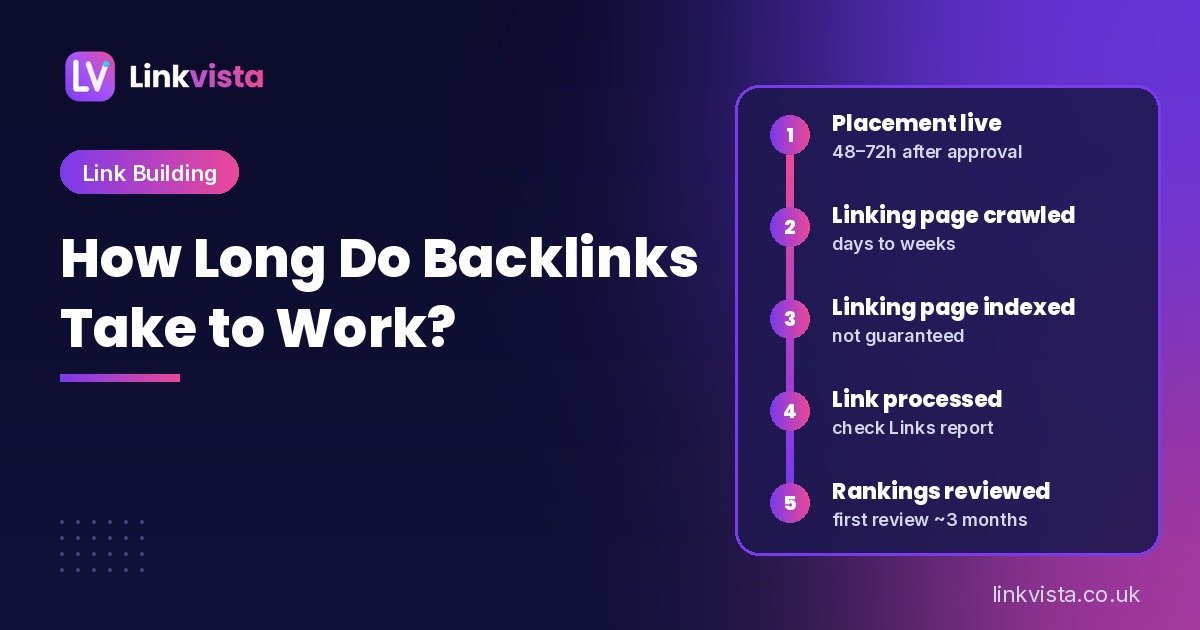
The five stages of a backlink timeline
The stages run in order, but they overlap in practice. Google doesn’t show you a record of every step, so some stages can only be inferred.
| Stage | What happens | Typical timing | What you can check |
|---|---|---|---|
| 1. Placement live | The article or link insertion is published | 48–72 hours after domain approval (Linkvista) | Live URL, anchor, target URL, rel attribute, link in the body text |
| 2. Linking page crawled | Googlebot fetches the page that contains the link | Days to weeks, depending on the host site | The publisher can check it with URL Inspection; you usually can’t |
| 3. Linking page indexed | Google decides whether to store the page in its index | Often soon after crawling, but not guaranteed | Publisher’s URL Inspection status; a warning sign if still not indexed after several weeks |
| 4. Link processed | Google takes the link into account for the target page | Not visible; follows indexing | Your Search Console Links report, which shows a sample of links |
| 5. Rankings respond | The target page’s impressions and positions change, or don’t | Weeks to months; review at about 3 months | Search Console Performance report against a baseline |
Stage 1: the placement goes live
This is the only stage you fully control with your supplier. Check that the link is on the agreed page, points to the agreed URL (not a redirect or a typo), uses the agreed anchor, sits in the body text rather than a footer or author box, and has the attribute you expected. Our free link analyzer lists every link on a page with its anchor and rel attributes, which makes this a two-minute job.
Also check that the linking page itself can be indexed. A page with a noindex tag, or one blocked from crawling, can still send visitors, but don’t expect it to help rankings.
Stage 2: Google crawls the linking page
Nothing happens in search until Googlebot fetches the page with your link on it. How quickly that happens depends mostly on the host site: an active site with real traffic, regular new content and good internal linking tends to be crawled more often than a quiet blog that publishes twice a year.
You can’t speed this up directly. Google’s documentation is clear that you can’t request indexing for URLs that you don’t manage, and that requesting a recrawl of the same URL several times won’t get it crawled any faster. The publisher can request indexing in their own Search Console, and a new guest post that is linked from the host’s homepage or blog index is easier for Google to find than one buried several pages deep.
Stage 3: the linking page is indexed
Crawling isn’t the same as indexing. Google’s own guide notes that “indexing isn’t guaranteed; not every page that Google processes will be indexed.” If a linking page is still not indexed several weeks after it went live, treat it as a problem to raise with the supplier, not as a delay to wait out. It can point to a thin article, a site Google doesn’t value, or a technical block. Our guide to vetting a guest post site before buying covers the checks that make this less likely.
Niche edits are a slightly different case. The host page is usually already indexed, which removes one uncertainty, but Google still has to recrawl the page to see the new link. Pages that Google revisits often are likely to be picked up sooner. Our explainer on what niche edits are covers how link insertions work.
Stage 4: Google processes the link
There is no notification when Google takes a link into account. The closest thing you have is the Links report in Search Console. Its “Latest links” export lists the most recently discovered links to your site, sorted by discovery date. But Google says the report “isn’t a comprehensive list of every link on your site” and shows a sample. A link that isn’t in the report hasn’t necessarily been ignored, and a link that is in it isn’t proof of any ranking effect.
Links marked rel="nofollow", "sponsored" or "ugc" are generally not followed by Google, so don’t expect them to behave like the followed links this timeline describes.
Stage 5: rankings and traffic respond
This is the stage clients care about, and it is the slowest and least predictable. A target page that already ranks on page two for its main query has less distance to cover than a new page targeting a competitive national term. Links also rarely act alone: content changes, internal links, competitors and Google updates all move rankings at the same time. That is why you should compare against a baseline over a fixed period rather than watching positions day by day.
What speeds backlinks up, and what slows them down
None of these factors guarantees a timeline, but together they explain most of the difference between links that seem to work quickly and links that seem to do nothing.
Factors that tend to help
- An active, well-crawled host site with real organic traffic. Our link quality policy requires at least 500 monthly organic visits for this reason.
- A relevant linking page that is internally linked from the host site’s homepage, blog index or category pages.
- A target page that deserves the link: indexed, useful, matched to the search intent and already supported by your own internal links.
- A target page that is close to the top results, for example ranking in positions 11–20 for queries with genuine demand.
- A steady monthly pace, which is easier to measure than one large batch. Our guide to how many backlinks a site needs per month explains how to set it.
Factors that tend to slow things down
- A target page that isn’t indexed, or whose canonical points to another URL. Links can’t lift a page Google isn’t showing.
- Linking pages that are orphaned or never indexed, which are common on sites that publish anything for anyone.
- Competitive queries where the pages ahead of you have years of links and content behind them. Local searches are often a different contest, against nearby firms rather than national brands. Our local link building guide covers that case.
- Weak relevance or forced anchors. An exact-match anchor on an unrelated site is a risk rather than a shortcut. See our anchor text strategy guide.
- Removed or altered links. Articles get edited and sites get sold, so re-check placements during the campaign rather than only at delivery.
How to check each stage in Google Search Console
You need access to the client’s Search Console property for the target site. Work through these steps in order.
- Before any links go live, record a baseline. In the Performance report, filter by the target page and note clicks, impressions, average position and the main queries. The report’s default view covers the past three months, which makes a convenient starting window.
- Inspect the target page. Use the URL Inspection tool and confirm the result says “URL is on Google” and that the Google-selected canonical is the page itself. If it isn’t indexed, fix that first. Links won’t solve an indexing problem on your own site.
- Log every placement on the day it goes live: linking URL, anchor, target URL, rel attribute and go-live date.
- Ask the publisher about the linking page’s status if it matters to the campaign. Only people with access to the host site’s Search Console property can inspect it there.
- Check the Links report every few weeks. Go to Links > External links > Top linked pages, open the target page and see which sites appear. Export “Latest links” to see recent discoveries by date. Remember it is a sample.
- Compare the same-length periods before and after in the Performance report, page by page, at around three months. Look at impressions and average position for the target queries first. Clicks usually follow later, if at all.
What to report to clients in weeks 1, 4 and 12
Clients tend to lose patience when they hear nothing, or when early noise is presented as a result. A simple schedule sets expectations from the start. If you resell links, our guide to white label SEO reports covers the format.
| When | What to report | What not to claim |
|---|---|---|
| Week 1 | Placement log: live URLs, anchors, target pages, rel attributes, go-live dates. Baseline figures for each target page. | Any ranking effect. It is too early. |
| Week 4 | Placement re-check (all links still live and unchanged). Which linking pages the publishers have confirmed as indexed, and any links now in the Links report. | That a small movement in positions was caused by the links. |
| Week 12 | Before-and-after comparison for each target page and its main queries: impressions, average position, clicks. Recommendation: continue, change target pages, or fix the page first. | Guaranteed future rankings, or that the links “failed” if competitive terms haven’t moved yet. |
For competitive national terms, add a further review at around six months before judging the campaign as a whole.
A worked example timeline (hypothetical)
To show how the stages fit together, here is a hypothetical order. It is an illustration of the process, not a client result. An agency orders three Standard guest posts (DR 30–49) at $125 each, $375 in total at our current prices, all pointing to one service page that ranks around positions 11–20 for its main query.
- Day 0: the agency approves three domains from our shortlist and records the target page’s baseline in Search Console.
- Days 2–3: the three guest posts go live, each a standard 1,000-word article. The agency logs the URLs and checks each link with a link checker.
- Week 1: the client gets the placement log and the baseline. No ranking claims.
- Week 4: all three links are re-checked. Two publishers confirm their pages are indexed; the third is chased.
- Week 12: the agency compares the 12 weeks before and after for the target page and decides whether to add links, move to a second target page or improve the page itself.
The quiet period between day 3 and week 12 is normal. What would be abnormal is a linking page that is still not indexed by week 4, or a link that has disappeared.
What to do if backlinks don’t seem to be working
If the 12-week review shows no change, work through the likely causes before buying more links:
- Are all the links still live, unchanged and followed? If one has been removed, ask for a replacement. Ours are replaced free if removed within 12 months of going live.
- Are the linking pages indexed? An unindexed page is unlikely to help.
- Is the target page indexed, self-canonical and a good match for the query’s intent?
- Are the competing pages far ahead on content, links or brand strength? If so, it may take more time and a steady pace rather than a burst.
- Did anything else change, such as a site redesign, a content rewrite or a Google update, that could hide or offset the effect?
A sudden batch of extra links is rarely the answer. Our guide to what a good link building campaign looks like covers how to plan the next phase.
Frequently asked questions
How long do backlinks take to work?
There is no fixed time. The linking page has to be crawled and indexed first, which can take days to weeks, and any effect on rankings usually builds over weeks to months after that. Review against a baseline at about three months, and allow longer for competitive terms.
How long does it take Google to find a new backlink?
It depends on how often Google crawls the linking site. For pages you ask it to recrawl, Google says crawling can take anywhere from a few days to a few weeks. Pages on active, well-linked sites tend to be found sooner.
Why doesn’t my new backlink show in Search Console?
The Links report shows a sample of links, not every link, and only links Google has discovered. A missing link may simply not have been crawled yet, or not be included in the sample. Check that the link is live, followed and on an indexable page.
Do niche edits work faster than guest posts?
Not necessarily. A niche edit sits on a page that is usually already indexed, but Google still has to recrawl that page to see the new link. A guest post on a frequently crawled site can be found just as quickly. Relevance and the strength of the host page matter more than the format.
Can I speed up the indexing of a backlink?
Not directly. You can only request indexing for URLs you manage, so the publisher would have to do it. Choosing active sites with real traffic, and asking the publisher to link the new article from their blog index, gives the link the best chance of being found quickly.
When should I judge whether a link building campaign is working?
Set a baseline before the first link goes live and do the first proper review at around three months. Check placements and indexing in the meantime, but don’t judge rankings week by week. For competitive national terms, review again at around six months.
Plan links with realistic timelines
We place guest posts and niche edits on relevant sites with real organic traffic. You approve every domain first, and links go live within 48–72 hours of approval. Guest posts start at $99 (DR 20–29) and go up to $489 (DR 70+) per link in USD, each with a standard 1,000-word article. Longer articles are charged extra per additional 500 words. Every order comes with an unbranded live report, and removed links are replaced free within 12 months.
See our link building services, including guest posting, compare tiers on our pricing page, try our free SEO tools, or contact us with your target pages and we will send a shortlist of relevant sites within 1 day.
Leave a Reply